

Results are
No need to wait by the door!
Your delicious delivery will typically arrive between 8 am and 8 pm. While we can’t provide a specific arrival time, there’s no need to stay home to greet us! Our boxes are like mini-fridges, specially designed with insulating liners and cooling packs to keep your ingredients chilled and happy until you get back. Once you’re home, just pop everything into the fridge to keep that peak freshness going!
You may change the delivery day on the website here
Alternatively, you may follow the steps below
On the HelloFresh website:
- Log in to your account.
- Click on your name in the upper right-hand corner and head to your Account Settings.
- Scroll down to the 'Delivery' section
- Click 'Edit' next to 'Delivery window' option, then select your desired delivery day.
- Click 'Save'
TIP: Just be sure to let us know by 11.59 pm PST 5 days prior to your next scheduled delivery so we can alert our suppliers.
On your HelloFresh App :
- Log in to your account on the app.
- Click on the 'Profile' icon at the bottom right-hand corner
- Click on the 'Edit' button under Preference Settings
- Scroll down to the 'Delivery' section
- Click 'Edit' next to 'Delivery window' option, then select your desired delivery day.
- Click 'Save'.
We want to make sure your delicious deliveries always fit your budget! You can easily preview your total and see a full breakdown for your upcoming box.
- Log in to your HelloFresh account.
- Click My Menu.
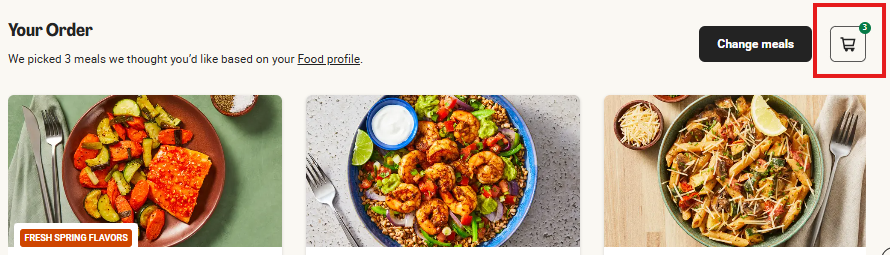
- Select your desired delivery week, you will see an Order Summary icon to the right above your selected recipes. Check out the image below.
- Select the Cart icon button and you will be redirected to a page that will break down the charges for your upcoming delivery.
You’re always the head chef of your own menu. 👨🍳
While we’ll always suggest some delicious recipes based on your Food Profile, you have total control over what lands on your doorstep. Every week, you can hand-pick your favorites from a rotating menu of over 100+ weekly items, including dinner recipes and Market finds. Just be sure to let us know by 11.59 pm PST 5 days prior to your next scheduled delivery so we can alert our suppliers.
How to select your meals:
Log in to your account and head to My Menu.
Browse the Menu: Navigate to your desired delivery week to see your current selections.
Swap & Add: If you’d like to switch a meal, simply click "Change meals." Use the ‘-’ button to remove a recipe and the ‘+’ button to add the ones you’re craving.
Personalize with HelloCustom: Want to swap a side or upgrade your protein? If available, select the recipe and any options to customize your meal will be listed.
Finish Up: Once you’ve picked your meals, click "Continue," select any extras from the HelloFresh Market, and hit "Save Selection!"
If you did not select an extra click 'Skip'.
You will now see a message confirming your meal selection has been saved.
If you’re not in love with any of the recipes, you can easily skip that week’s delivery by clicking 'Skip this Week' in the ‘Edit Delivery’ tab above the menu.
Note: Just a heads-up that a small surcharge may apply for certain premium upgrades or HelloCustom swaps. You'll always see the price clearly listed before you make the switch!

ABOUT HELLOFRESH

ACCOUNT MANAGEMENT

Delivery

PAYMENT & BILLING

PLACING & EDITING ORDERS

RECIPES & INGREDIENTS

VOUCHERS & GIFT CARDS

The Hellofresh App

Social Responsibility
FOOD SAFETY