

Results are
There are many reasons why a payment may have failed. To resolve this, we recommend trying the following:
If using a Credit Card, please check to ensure that it is not expired, if expired, you may update new credit card information here
Ensure that there are sufficient funds in your account.
Call your bank or financial institution to find out what is wrong with your account and the reason for the failure.
Ensure that the billing address on your HelloFresh account is updated.
Yes! We care just as much about our packaging as the delicious recipes that come inside it. Here’s how to recycle each part of the HelloFresh box responsibly:
Insulating liners
Depending on the season, your box may include different insulators to keep ingredients fresh. Our corrugated liners, honeycombed paperboard, and ClimaCell plant-based insulation foam are all fully recyclable.
Gel packs
Follow the directions provided on your ice pack. Otherwise, cut open the pack, empty the gel into the trash, then rinse and recycle or discard the plastic film via in-store drop-off. To avoid clogging your pipes, please don’t put the contents of the ice packs in your sink or toilet.
Dry Ice
Dry ice can be placed in a ventilated area at room temperature, where it will evaporate away. Keep it out of reach of children and pets.
Dry ice should never be disposed of in a trash can, chemical waste container, garbage can, sink, or toilet. To prevent an injury similar to a burn, always use protective gloves.
HelloFresh box
Most of our boxes are 100% recycled content cardboard, and all are at minimum 40% recycled content. Fold and place with your curbside recyclables, or even compost them!
Meal kit bags
The paper bags for your meal kits are fully recyclable and compostable. You can also discard the sticky-backed label in your regular trash bin.
Plastic bags
If your plastic packaging has the numbers 2 or 4 on it, it’s recyclable. If not, you can discard it in your regular trash bin.
Visit our dedicated Recycling page here for details on how to recycle each part of the HelloFresh box responsibly.
Insulating liners
- Summer and winter liners: honeycomb paperboard with a pulper-safe metalized film
- Summer liners: recycled cotton, jute, and kraft paper
- Winter liners: BPA-free plastic and mylar
Gel packs
- Water soluble gel (it dissolves in water but is not pipe-friendly, so don’t pour down the drain!) and recyclable plastic
HelloFresh box
- Mix of recycled and virgin fibers
Separator and meal kits
- Low-density chipboard
Ready to bring the joy of cooking back to your kitchen? We’ve been busy in the HelloFresh test kitchen making sure each weekly box is better than ever.
You can now choose from over 100+ weekly menu and market items, featuring a rotating selection of deliciously simple dinner recipes every single week. / / Whether you’re a kitchen pro or just starting out, we make sure every meal is a win with:
Stress-Free Cooking: Our easy-to-follow, 6-step recipes take approximately 30 minutes and require minimal equipment.
Endless Variety: With over 100 options across all our plans, there’s always something new and wholesome to discover.
Total Flexibility: From easily customizable menus to flexible deliveries (and the option to skip or cancel anytime), we fit perfectly into your busy life.
HelloCustom: Want to swap your sides or upgrade your protein? You can personalize your favorite meals to get exactly what you’re craving.
Pro Tip: Our "Market" items are perfect for those days when you need a quick lunch, a festive brunch, or a little something sweet to end the night.
Tailor Your Menu with Your Food Profile
Your menu, your way. We want every HelloFresh box to feel like it was curated just for you! By updating your Food Profile, you can let our chefs know exactly what you love. Whether you’re looking for No Pork, No Fish, or Pescatarian options, we’ll make sure your automatic meal picks align perfectly with your lifestyle.
While you’ll always have access to our full weekly menu, this helps us highlight the recipes that best fit your taste and goals.
Active users can update their Food Profile by clicking here
We provide allergen information on recipe cards and/or ingredient packaging. We recommend reviewing the ingredients in each recipe before placing your order to ensure our meals meet your needs. We strongly recommend that customers with food allergen sensitivities or restrictions carefully review individual product packages for the most updated information regarding ingredients and allergen declaration before consuming. Additionally, we recommend reviewing the ingredient list on our website, prior to selecting meals, to determine if they contain any ingredients you are unable to consume.
At HelloFresh, we prioritize transparency so you can cook with peace of mind. While we don’t currently offer certified gluten-free or nut-free meal plans, our diverse weekly menu makes it easy to find recipes that work for you. All ingredient information and potential allergens are listed for every recipe, allowing you to review and select the meals that best meet your dietary needs.
As for our vegan/vegetarian options, we want to make plant-based eating as delicious as possible:
- Vegan Recipes: We offer dedicated Vegan meals every week that are naturally dairy-free.
- Veggie Flexibility: Many of our Vegetarian meals can be easily adapted to be dairy-free by simply omitting items like cheese or cream during your home prep.
Our weekly menu features a wide variety of Veggie and Vegan recipes, packed with fresh seasonal produce, hearty grains, and delicious plant-based proteins.
Tailored to Your Taste
Vegan Favorites: Look for the "Vegan" tag for recipes that are entirely plant-based and dairy-free.
Veggie Flexibility: Our "Veggie" recipes are perfect for vegetarians. Want to make them vegan? You can easily customize these dishes at home by simply omitting or swapping ingredients like cheese, yogurt, or honey.
Yes! Here is how to find it:
On Web
- Log in to your account.
- Choose 'My Menu'.
- Choose the image of the meal that you’d like to learn about. A pop-up window will appear, scroll down to the Nutrition Values section.
On Mobile
- Log in to your account on the app.
- Choose 'My Menu'.
- Choose the image of the meal that you’d like to learn about. A pop-up window will appear, scroll down and select Nutrition Values section.
We’re so glad to have you back with us! To reactivate your subscription, there is no need to go through the checkout process all over again.
If on desktop, simply log in to your account and you will see the following banner:
Click on the Button and follow the prompts to reactivate your subscription and pick your meals!
Alternatively, You can also follow the steps below to reactivate on the web:
- Click on your name in the upper right-hand corner and choose Account Settings.
- Plan Settings will list all the Canceled plans and a Review and Reactivate button. Click to Reactivate!
To make changes on the Mobile App:- Open the HelloFresh app and select Review details to reactivate at the top of the screen.
- Confirm or update your meal preferences, serving size, and number of meals per week and if necessary update your delivery address!
- Scroll down to see your summary and select 'Promo Code' to enter a promotion, if applicable and select Reactivate.
- Select Got it to confirm that the subscription has been successfully reactivated.
Keeping your info up to date is a breeze so you never miss a delicious delivery.
Here’s how to update your address in a few quick clicks:
Log in to your HelloFresh account.
Click HERE or select your name in the upper right-hand corner and head to Account Settings.
Select Plan Settings from the menu.
Scroll down to the Delivery section.
Click Edit next to Delivery Address.
Pro-tip: This is also where you can add Delivery Instructions to ensure your box arrives safely!
- Make your changes and hit Save.
Just a heads-up: to make sure your next box finds its way to the right doorstep, be sure to update your address by 11:59 PM PT, 5 days before your scheduled delivery. If you make changes after your order has been finalized, they'll be saved for your next box.
Did you know you can skip a delivery week instead? Here’s how:
- Log in to your account.
- Click on My Menu.
- Select the delivery day of the week you’d like to skip, then click Edit Delivery.
- When the banner appears, click Skip This Week
But if you’d prefer to cancel, you can do so by clicking HERE. Please follow all of the prompts on the screen to finalize.
Just be sure to pause/cancel by 11:59 pm PST 5 days prior to your next scheduled delivery so we can alert our suppliers.
If you’re thinking about canceling, please keep in mind that most credits, including referral bonuses, promotional offers, and credits issued by customer care are only available while your account is active and will be removed upon cancellation of your subscription.
Don't worry about surprises, during the cancellation process, you will see a summary screen showing the exact amount of HelloFresh Cash you will lose if you proceed.
Please note that we unfortunately cannot process box cancellations requested after the cut-off date. You will be responsible for all charges incurred for already processed orders.
Pro tip: You can reactivate your account anytime by logging back in and clicking the Reactivation button. Hope to see you again soon!
On Mobile App
- Log in to your HelloFresh account
- Click on the Profile icon that appears on the bottom right.
- Click on Personal info.
- Your credit balance will appear underneath your customer id.
On Web
- Log in to your HelloFresh account
- Click on your name in the upper right-hand corner and select Account Settings from the drop down menu.
- Select Account Info.
- Scroll down to Your Credit to view the credit amount on your account.
Heads up, your voucher & HelloFresh Cash (credits) are stackable, which means if you have both a discount code and a credit in your account, we'll apply both towards your next delivey.
You even have the flexibility to choose exactly when to use it! In order to apply your credit to your delivery, you will need to apply yours manually. To manually apply your balance, simply head to your cart for any upcoming editable week and select "Apply". Any remaining credit balance will be made available for use towards the following box.
Please keep in mind that most credits, including are only available while your account is active and will be removed upon cancellation of your subscription.
💡 Pro-Tip: Pause, Don't Cancel!
To keep your HelloFresh Cash from being forfeited, simply skip your deliveries instead of cancelling. Your credits stay in your account until they expire.
To view our Terms & conditions, please click HERE.
We want you to get the most out of your HelloFresh experience! If you’re thinking about canceling, please keep in mind that most credits, including referral bonuses, promotional offers, and Customer Care compensation are only available while your account is active and will be removed upon cancellation of your subscription.
Don't worry about surprises, during the cancellation process, you will see a summary screen showing the exact amount of HelloFresh Cash you will lose if you proceed.
💡 Pro-Tip: Pause, Don't Cancel!
To keep your HelloFresh Cash from being forfeited, simply skip your deliveries instead of cancelling. Your credits will remain on your account.
To view our Terms & conditions, please click HERE.
Forgot your password? Don't worry, we’ll have you back to browsing delicious recipes in no time!
If you’ve forgotten your password, just follow these quick steps to get back into your account:
Head over to our Login Page HERE.
Click on "Forgot Your Password?" right below the login fields.
Enter the email address associated with your HelloFresh account.
Keep an eye on your inbox! Within 5–10 minutes, you’ll receive an email titled "Password Reset" containing a secure link to create a new one.
Quick Tip: If the email hasn’t arrived after a few minutes, give your spam or junk folder a quick peek.
You can easily switch the number of meals received per week, and the serving sizes in 2 different ways :
A One-off Switch
- Log in to your account.
- Go to 'My Menu' for the week you want to switch the plan.
- Click on 'Edit Delivery'.
- Click 'Change Box Size'
- Select the 'Number of People' and the 'Number of Recipes'
- Then click 'Confirm'.
Switch for All Future Deliveries
- Log in to your account.
- Click on your name in the upper right-hand corner and head to your Account Settings.
- Select 'Plan Settings'.
- Under Your Plan, select your serving size in the 'Number of people' drop down menu and 'Number of meals'
- Click 'Save'.
- Log in to your HelloFresh account.
- Click on your name in the upper-right hand corner and choose Notifications from the drop down menu.
We have specially designed boxes with insulated liners and cooling gel packs that are modified seasonally to ensure optimal freshness in transit.
Note: We advise that you place all perishable items in the refrigerator immediately upon delivery.
We deliver to all states across the continental US. At the moment we also deliver to select zip codes in Honolulu, Hawaii and Anchorage, Alaska.
Not sure if we’re in your neighborhood yet?
You can easily check if we deliver to your specific zip code by clicking HERE.
You may change the delivery day on the website here
Alternatively, you may follow the steps below
On the HelloFresh website:
- Log in to your account.
- Click on your name in the upper right-hand corner and head to your Account Settings.
- Scroll down to the 'Delivery' section
- Click 'Edit' next to 'Delivery window' option, then select your desired delivery day.
- Click 'Save'
TIP: Just be sure to let us know by 11.59 pm PST 5 days prior to your next scheduled delivery so we can alert our suppliers.
On your HelloFresh App :
- Log in to your account on the app.
- Click on the 'Profile' icon at the bottom right-hand corner
- Click on the 'Edit' button under Preference Settings
- Scroll down to the 'Delivery' section
- Click 'Edit' next to 'Delivery window' option, then select your desired delivery day.
- Click 'Save'.
If you know that your card is going to expire, please update your credit card information on your HelloFresh account.
You may update your payment details here
Alternatively, you may follow the steps below
On the HelloFresh Website:
- Log in to your account.
- Click on your name in the upper right-hand corner and select Account Settings from the drop-down menu.
- Scroll down to 'Payment Methods' on the Plan Settings page.
- Alternatively, you can select ‘Payment Method’ from the option on the left.
- Select ‘Change Payment Method’.
- Click 'Add'.
- Enter new payment information, click ‘Add’ then click 'Save'.
On your HelloFresh App :
- Log in to your account on the app.
- Click on the 'Profile' icon at the bottom right-hand corner
- Click 'Payment'.
- Scroll down to 'Payment Methods'.
- Select ‘Add Payment Method’, then update your payment information.
- Once done, click ‘Add’ and then ‘Save’.
You may update your payment details on the website here
Alternatively, you may follow the steps below
On the HelloFresh Website:
- Log in to your account.
- Click on your name in the upper right-hand corner and select Account Settings from the drop-down menu.
- Scroll down to 'Payment Methods' on the Plan Settings page.
- Alternatively, you can select ‘Payment Method’ from the option on the left.
- Select ‘Change Payment Method’.
- Click 'Add'.
- Enter new payment information, click ‘Add’ then click 'Save'.
On your HelloFresh App :
- Log in to your account on the app.
- Click on the 'Profile' icon at the bottom right-hand corner
- Click 'Payment'.
- Scroll down to 'Payment Methods'.
- Select ‘Add Payment Method’, then update your payment information.
- Once done, click ‘Add’ and then ‘Save'.
If your payment fails during checkout, you will see an error message on your screen.
If a recurring payment fails, you will receive an email alerting you of the error. You may also receive pop-ups on the web/app regarding the failed payment.
To resolve this, click here to update your payment.
Once you successfully updated your payment, follow the steps below to reprocess your payment.
- Click on your name in the upper right-hand corner and select Account Settings from the drop-down menu.
- Select Order History from the list of options on the left hand side of the screen.
- For your upcoming order, you will see an option to Pay Now
- Click on Pay Now and follow prompts to reprocess your payment.
When you subscribe to HelloFresh, you're signing up for a recurring weekly service, ensuring you receive a box of delicious ingredients and recipes each week. You will be charged the day after the deadline to make changes. Each week, you can view the last day to make changes on the My Menu.

We want to make sure your delicious deliveries always fit your budget! You can easily preview your total and see a full breakdown for your upcoming box.
- Log in to your HelloFresh account.
- Click My Menu.
- Select your desired delivery week, you will see an Order Summary icon to the right above your selected recipes. Check out the image below.
- Select the Cart icon button and you will be redirected to a page that will break down the charges for your upcoming delivery.
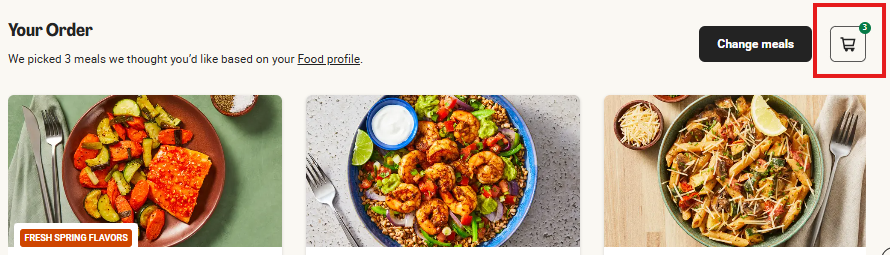
As soon as you join the HelloFresh family, we’ll get to work on your first delicious box! Your first order is charged and confirmed right away. You can hand-pick your favorite recipes for that first delivery in My Menu, and if you need a hand with any other last-minute tweaks, our friendly Customer Care team is always here to help.
For all your future boxes, you’re in total control! Simply hop into Account Settings to update your box size, preferences, or delivery address whenever life changes.
You’re always the head chef of your own schedule! Whether you’re heading out of town or just need a break, skipping a week is a breeze. Here’s how:
- Login to your account.
- Click on 'My Menu'.
- Select the delivery week you'd like to skip, then click 'Edit Delivery'.
- When the ‘Manage Your Delivery’ banner appears, click ‘Skip this week’.
A quick heads-up: Just be sure to let us know by 11.59pm PST 5 days prior to your next scheduled delivery so we can alert our supplier.
The best part? You won’t be charged for skipped weeks, and all your hard-earned discounts or promotions will stay tucked safely in your account for when you’re ready to cook again!
You bet. Customers can select between 2 and 12 meals per week for either 2, 4, or 6 people (select customers have the option for 3 people).
As an existing HelloFresh Customer, you can change the number of meals and serving size you get here.
Customers can also simply add more meals from any menu page just for a given week by clicking on the Add Extra Meal button.
Recipes? Absolutely! Ingredients? We’ve got that covered, too. Every week, you get to hand-pick your favorite meals from our diverse menu.
HelloCustom Swaps: On select weekly recipes, you now have the flexibility to customize your meal exactly how you like it. This includes the ability to swap, upgrade, or add proteins and sides, with occasional options to choose organic ingredients.
How to Swap Ingredients:
Pick Your Recipe: While browsing the weekly menu, click on the recipe to open the details. If any swap options are available, they will be listed. Simply select your preferred ingredient and select add.
Total Transparency: Every recipe—both on our website and your physical recipe cards—clearly lists all ingredients and the top 8 allergens.
Stay Organized: Everything comes individually packaged in your meal box, making it easy to see exactly what’s going into your dinner.
Chef’s Choice: Since you’re the pro in your own kitchen, feel free to omit or substitute any ingredient at home to perfectly match your dietary preferences!
Ready to get cooking? If you’re already an existing customer, click HERE to start picking your next delicious menu.
Yes! You’re the head chef of your own kitchen, so you have total control over what’s on the menu every week.
You can select up to 8-12 meals per week for either 2, 4, 6 people (select customers can opt for 3 people) here.
We offer a diverse, rotating menu that allows you to select the specific recipes you want delivered to your door. If you don't make a selection, we’ll simply send you delicious recommendations based on your initial taste preferences.
Not in love with any of the recipes? You can easily skip that week’s delivery by clicking Edit Delivery from the banner and then selecting Skip this week.
Just be sure to let us know by 11.59 pm PST 5 days prior to your next scheduled delivery so we can alert our suppliers.
You’re always the head chef of your own menu. 👨🍳
While we’ll always suggest some delicious recipes based on your Food Profile, you have total control over what lands on your doorstep. Every week, you can hand-pick your favorites from a rotating menu of over 100+ weekly items, including dinner recipes and Market finds. Just be sure to let us know by 11.59 pm PST 5 days prior to your next scheduled delivery so we can alert our suppliers.
How to select your meals:
Log in to your account and head to My Menu.
Browse the Menu: Navigate to your desired delivery week to see your current selections.
Swap & Add: If you’d like to switch a meal, simply click "Change meals." Use the ‘-’ button to remove a recipe and the ‘+’ button to add the ones you’re craving.
Personalize with HelloCustom: Want to swap a side or upgrade your protein? If available, select the recipe and any options to customize your meal will be listed.
Finish Up: Once you’ve picked your meals, click "Continue," select any extras from the HelloFresh Market, and hit "Save Selection!"
If you did not select an extra click 'Skip'.
You will now see a message confirming your meal selection has been saved.
If you’re not in love with any of the recipes, you can easily skip that week’s delivery by clicking 'Skip this Week' in the ‘Edit Delivery’ tab above the menu.
Note: Just a heads-up that a small surcharge may apply for certain premium upgrades or HelloCustom swaps. You'll always see the price clearly listed before you make the switch!
If you have recipe surveys authorized in your notifications settings, you will receive a weekly survey to review your meals.
Alternatively, you may also review recipes by selecting Past Deliveries at the top of the page.
- Find the recipe you would like to review
- Below the picture of the meal, select the 1-4 star rating
- A small pop up will open where you can adjust your rating and leave feedback about the recipe
- Once done click Send Feedback
Recipe cards for your selected meals will come in your weekly delivery.
You may also download them by accessing the My Menu page.
- Log onto HelloFresh.com and then click on My Menu
- Click the picture of the recipe
- When the pop of the meal appears, scroll down till you see Instructions and select Download
- The recipe will then download as a PDF file to your computer for you to access.
Yes! Here is how to find it:
On Web
- Log in to your account.
- Choose 'My Menu'.
- Choose the image of the meal that you’d like to learn about. A pop-up window will appear, scroll down to the Nutrition Values section.
On Mobile
- Log in to your account on the app.
- Choose 'My Menu'.
- Choose the image of the meal that you’d like to learn about. A pop-up window will appear, scroll down and select Nutrition Values section.
Our weekly menu features a wide variety of Veggie and Vegan recipes, packed with fresh seasonal produce, hearty grains, and delicious plant-based proteins.
Tailored to Your Taste
Vegan Favorites: Look for the "Vegan" tag for recipes that are entirely plant-based and dairy-free.
Veggie Flexibility: Our "Veggie" recipes are perfect for vegetarians. Want to make them vegan? You can easily customize these dishes at home by simply omitting or swapping ingredients like cheese, yogurt, or honey.
At HelloFresh, we prioritize transparency so you can cook with peace of mind. While we don’t currently offer certified gluten-free or nut-free meal plans, our diverse weekly menu makes it easy to find recipes that work for you. All ingredient information and potential allergens are listed for every recipe, allowing you to review and select the meals that best meet your dietary needs.
As for our vegan/vegetarian options, we want to make plant-based eating as delicious as possible:
- Vegan Recipes: We offer dedicated Vegan meals every week that are naturally dairy-free.
- Veggie Flexibility: Many of our Vegetarian meals can be easily adapted to be dairy-free by simply omitting items like cheese or cream during your home prep.
We provide allergen information on recipe cards and/or ingredient packaging. We recommend reviewing the ingredients in each recipe before placing your order to ensure our meals meet your needs. We strongly recommend that customers with food allergen sensitivities or restrictions carefully review individual product packages for the most updated information regarding ingredients and allergen declaration before consuming. Additionally, we recommend reviewing the ingredient list on our website, prior to selecting meals, to determine if they contain any ingredients you are unable to consume.
Love HelloFresh and want to share with your friends and family?!
Once logged in, click HelloFriends at the top right of the page or click HERE.
Please note that the referral offers can only be redeemed by first time customers.
Referrals are free gifts you earn from us as you continue your subscription. You can send them to friends/family who have never tried our service before. Your specific offer you can share will appear in your account on the HelloFriends page.
When successfully redeemed, you will receive credit to activate on your account via email! The email will include the credit amount and how to redeem it. This is the only way to redeem your credit!||
After completion, your credit will appear in your account settings under ‘Account Info’ and apply to your next order!
Customers can send out an unlimited amount of referrals however, you will only receive credit for a max of 10 successfully redeemed referrals!
Offer is subject to change and might reflect different offers for HelloFriends.
- Head to HelloFresh.com.
- Select Gift Cards from the banner at the top.
- On the Gift Cards page, click Buy Gift Card.
- You will then be navigated to an area of the page where you can pick your gift amount from the options available.
- Enter the recipient’s name and email and don’t forget to leave a message!
- Select the date for e-delivery and then click Go To Checkout.
- Follow the prompts to checkout.
*Though you will be prompted to enter shipping information, no physical gift card will be mailed physically. You may enter your billing address in the field.
Yes!
Current college students in the U.S. are eligible for a discount via UNiDAYS. Click here to verify your eligibility.
HelloFresh Rewards is our way of saying thanks for being part of the HelloFresh family! HF Rewards is a free, opt-in loyalty program designed to reward you for doing what you already do—cooking great meals and engaging with us.
How it Works
- Earn as You Cook: You’ll earn 10 points for every $1 spent on your boxes (after discounts).
- Bonus Points: Complete fun Challenges like rating your favorite recipes or referring friends to boost your balance.
- Track Your Progress: Check your points anytime in the Profile Tab of our app or the top navigation bar on our website.
Snagging the Goods
Visit the Reward Store to trade your points for delicious perks, including:
-Vouchers: $10 off Add-ons or Premium meal surcharges.
-Big Savings: Up to $30 off a future box or free shipping credits.
-The Wallet: Once you unlock a reward, it lives in your Wallet until you’re ready to apply it at checkout.
Managing your points
-Expiration: To keep things fresh, points expire if you cancel your subscription or after 12 months of inactivity. Purchased vouchers typically stay valid for 6 weeks. We always use your oldest points first, so you never have to worry about missing out!
Ready to start earning? Head to your Profile to opt-in and see what's cooking!
Please note: HelloFresh Rewards is being released in stages, so if you can’t sign up just yet, don’t worry. You’ll receive an email as soon as you’re eligible to join the program!"
We want every box to feel like it was curated just for you. Instead of a one-size-fits-all setting, you can now update your Food Profile to let our chefs know exactly what you love (and what you don't).
To update your preferences in the app:
Log in to your HelloFresh app.
Tap the Profile icon in the bottom right-hand corner.
Select Food Profile where you can exclude specific proteins like beef, pork, or seafood to ensure your automatic weekly picks always align with your lifestyle.
Hit Save and then Confirm to lock in your delicious new settings!
Pro Tip: Even with a preference set, you can always head to "My Menu" to manually swap recipes or use HelloCustom to change ingredients on specific meals.
All active customers can easily customize their menu up to 5 days prior to their next scheduled delivery date. Here’s how:
- Log in to your account on the app.
- Click on My Menu from the option at the bottom.
- Select the delivery day you would like to edit.
- Click on Change meals.
- You can then un-select the meals by clicking the minus button and select the meals you prefer with the plus button.
- When done, click Continue.
- Select any extras you would like to add, if any, then click All done!. If not, select Skip.
- You will now see your meal selections and any addons appear on your menu.
- Log in to your account on the app.
- Click on Home.
- Choose the delivery week that you will like to skip.
- Select Edit Delivery and then select Skip this week.
Just be sure to pause/cancel by 11:59 pm PST 5 days prior to your next scheduled delivery so we can alert our suppliers.
Switch it up whenever life changes! 🔄
Whether your family is growing or you just want a few more delicious meals each week, you can easily adjust your box settings directly in the app.
To update your box type:
Log in to your account on the HelloFresh app.
Tap the Profile icon in the bottom right-hand corner.
Click Edit on the Preference Settings tab.
In the Meal Preferences section, you can update:
Number of People: Adjust the serving size for your household.
Number of Meals: Select how many recipes you’d like to receive each week.
Click Save and then Confirm to lock in your new plan!
Pro Tip: Want to personalize your meals even further? Once you’ve updated your box type, head to "My Menu" to use HelloCustom to swap or upgrade select proteins and sides on individual recipes.
- Log in to your account on the app.
- Click on the Profile icon at the bottom right-hand corner.
- Click on Personal Info.
- To edit first and last name, click on the 'Edit' button at the top right. When done click on 'Done'.
- To update all other person info, please click on the appropriate tab and submit your updates.
Add a recipe
You can keep all your favorite finds in one place. When you spot a recipe you love on social media or a website, just tap the Share icon on your phone and select the HelloFresh app from the list (you might need to tap 'More' or '...' to find us). We’ll whisk that recipe right into your digital cookbook, ingredients and all!
View saved recipes
To find your saved and imported recipes, just tap the Bookmark icon at the top of your HelloFresh app. It’s like having a secret stash of delicious inspiration right in your pocket.
At HelloFresh, we’re on a mission to make wholesome, delicious meals available to everyone.
While we cannot reroute a scheduled delivery to a charity for you to donate, you can still make an impact! Through our Meals with Meaning program, we partner with organizations like Table to Table and Second Helpings Atlanta to deliver fresh ingredients directly to families in need.
How you can help:You can donate a monetary amount via the Beyond the Box section in the HelloFresh Market (Add-ons menu) while you shop!
If you are using an iPhone or iPad, you can request to delete your account directly through the HelloFresh app. Follow these steps:
Select the 'Profile' and navigate to the 'Personal Info' section in your app settings.
Tap the 'Delete Account' button.
Note: If you have an active subscription, you must cancel it first. You will see a "Go to website" link to complete the cancellation.
Once your subscription is cancelled, return to the app and select 'Send Request'. This will generate a pre-populated request to our Data Protection team to begin the deletion process.
Currently, the "Delete Account" button is a specific feature for iOS users. If you are using an Android device or a web browser please click HERE.
Please note that the process of fulfilling your request may take up to 90 calendar days. Be advised that we cannot delete all information immediately, as we must retain a minimal record of your request and certain historical data as necessary to complete a contract, fulfill a legal obligation, or comply with other statutory exceptions.
Review our Privacy Policy for more information.

ABOUT HELLOFRESH

ACCOUNT MANAGEMENT

Delivery

PAYMENT & BILLING

PLACING & EDITING ORDERS

RECIPES & INGREDIENTS

VOUCHERS & GIFT CARDS

The Hellofresh App

Social Responsibility
FOOD SAFETY