Results are
Keeping your info up to date is a breeze so you never miss a delicious delivery.
Here’s how to update your address in a few quick clicks:
Log in to your HelloFresh account.
Click HERE or select your name in the upper right-hand corner and head to Account Settings.
Select Plan Settings from the menu.
Scroll down to the Delivery section.
Click Edit next to Delivery Address.
Pro-tip: This is also where you can add Delivery Instructions to ensure your box arrives safely!
- Make your changes and hit Save.
Just a heads-up: to make sure your next box finds its way to the right doorstep, be sure to update your address by 11:59 PM PT, 5 days before your scheduled delivery. If you make changes after your order has been finalized, they'll be saved for your next box.
Did you know you can skip a delivery week instead? Here’s how:
- Log in to your account.
- Click on My Menu.
- Select the delivery day of the week you’d like to skip, then click Edit Delivery.
- When the banner appears, click Skip This Week
But if you’d prefer to cancel, you can do so by clicking HERE. Please follow all of the prompts on the screen to finalize.
Just be sure to pause/cancel by 11:59 pm PST 5 days prior to your next scheduled delivery so we can alert our suppliers.
If you’re thinking about canceling, please keep in mind that most credits, including referral bonuses, promotional offers, and credits issued by customer care are only available while your account is active and will be removed upon cancellation of your subscription.
Don't worry about surprises, during the cancellation process, you will see a summary screen showing the exact amount of HelloFresh Cash you will lose if you proceed.
Please note that we unfortunately cannot process box cancellations requested after the cut-off date. You will be responsible for all charges incurred for already processed orders.
Pro tip: You can reactivate your account anytime by logging back in and clicking the Reactivation button. Hope to see you again soon!
You may change the delivery day on the website here
Alternatively, you may follow the steps below
On the HelloFresh website:
- Log in to your account.
- Click on your name in the upper right-hand corner and head to your Account Settings.
- Scroll down to the 'Delivery' section
- Click 'Edit' next to 'Delivery window' option, then select your desired delivery day.
- Click 'Save'
TIP: Just be sure to let us know by 11.59 pm PST 5 days prior to your next scheduled delivery so we can alert our suppliers.
On your HelloFresh App :
- Log in to your account on the app.
- Click on the 'Profile' icon at the bottom right-hand corner
- Click on the 'Edit' button under Preference Settings
- Scroll down to the 'Delivery' section
- Click 'Edit' next to 'Delivery window' option, then select your desired delivery day.
- Click 'Save'.
Remember that the deadline to make any updates to your HelloFresh account is 5 days prior to your next scheduled delivery.
Any changes that you make 1-4 days prior to your scheduled delivery (or even the day of your delivery) will be reflected in your HelloFresh account but will not affect that specific box, which will have already been processed.
However, the change(s) will be taken into account for any future deliveries provided you made the change(s) at least 5 days prior to your following delivery.
You’re always the head chef of your own schedule! Whether you’re heading out of town or just need a break, skipping a week is a breeze. Here’s how:
- Login to your account.
- Click on 'My Menu'.
- Select the delivery week you'd like to skip, then click 'Edit Delivery'.
- When the ‘Manage Your Delivery’ banner appears, click ‘Skip this week’.
A quick heads-up: Just be sure to let us know by 11.59pm PST 5 days prior to your next scheduled delivery so we can alert our supplier.
The best part? You won’t be charged for skipped weeks, and all your hard-earned discounts or promotions will stay tucked safely in your account for when you’re ready to cook again!
- Login to your account
- Click on 'My Menu'
- Select the delivery day of the week you'd like to skip, then click 'Edit Delivery'.
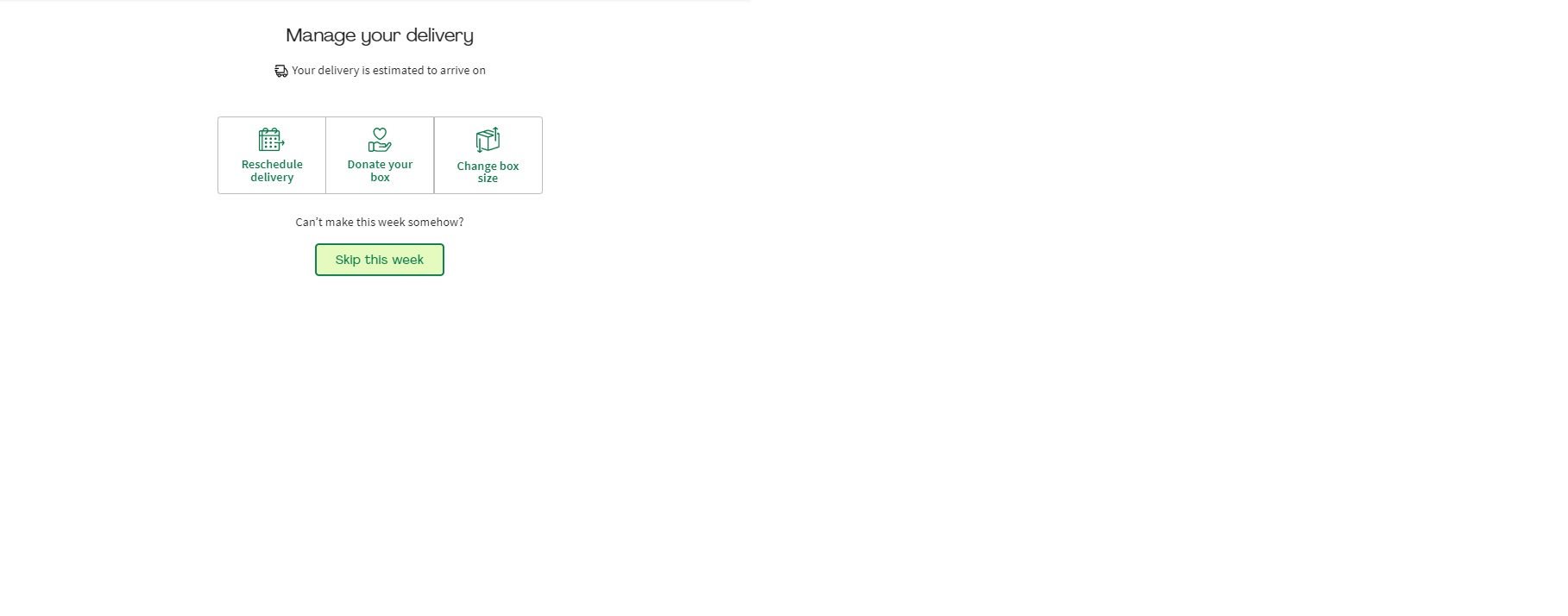
- Then select 'Skip this week' from the banner that appears.
- If you have a multi-week discount or credit on your account, don't worry! The discount will still stay intact and only apply to the weeks that you order, until expired.
*Just be sure to let us know by 11.59pm PST 5 days prior to your next scheduled delivery so we can alert our suppliers.
Yes! You’re the head chef of your own kitchen, so you have total control over what’s on the menu every week.
You can select up to 8-12 meals per week for either 2, 4, 6 people (select customers can opt for 3 people) here.
We offer a diverse, rotating menu that allows you to select the specific recipes you want delivered to your door. If you don't make a selection, we’ll simply send you delicious recommendations based on your initial taste preferences.
Not in love with any of the recipes? You can easily skip that week’s delivery by clicking Edit Delivery from the banner and then selecting Skip this week.
Just be sure to let us know by 11.59 pm PST 5 days prior to your next scheduled delivery so we can alert our suppliers.
You’re always the head chef of your own menu. 👨🍳
While we’ll always suggest some delicious recipes based on your Food Profile, you have total control over what lands on your doorstep. Every week, you can hand-pick your favorites from a rotating menu of over 100+ weekly items, including dinner recipes and Market finds. Just be sure to let us know by 11.59 pm PST 5 days prior to your next scheduled delivery so we can alert our suppliers.
How to select your meals:
Log in to your account and head to My Menu.
Browse the Menu: Navigate to your desired delivery week to see your current selections.
Swap & Add: If you’d like to switch a meal, simply click "Change meals." Use the ‘-’ button to remove a recipe and the ‘+’ button to add the ones you’re craving.
Personalize with HelloCustom: Want to swap a side or upgrade your protein? If available, select the recipe and any options to customize your meal will be listed.
Finish Up: Once you’ve picked your meals, click "Continue," select any extras from the HelloFresh Market, and hit "Save Selection!"
If you did not select an extra click 'Skip'.
You will now see a message confirming your meal selection has been saved.
If you’re not in love with any of the recipes, you can easily skip that week’s delivery by clicking 'Skip this Week' in the ‘Edit Delivery’ tab above the menu.
Note: Just a heads-up that a small surcharge may apply for certain premium upgrades or HelloCustom swaps. You'll always see the price clearly listed before you make the switch!
When signing up for HelloFresh, you are enrolling in a weekly, auto-renewing subscription service.
Coupons or vouchers may discount all or part of your initial delivery, but your subscription will automatically continue (with weekly charges to your account) unless you choose to skip or cancel deliveries.
Just remember to let us know at least 5 days prior to your next scheduled delivery if you wish to skip or cancel — no minimum commitment required.
If you are redeeming an e-gift card purchased from our website, you will not be enrolled in a subscription.
We simply ask for a valid payment method so that you can easily convert your account to a subscription if you wish to continue after receiving your free box.
Rest assured, however, that we will not enroll or charge you for additional deliveries unless you choose to convert your gift card account to a subscription.
All active customers can easily customize their menu up to 5 days prior to their next scheduled delivery date. Here’s how:
Log in to your account on the app.
Click on the Profile icon at the bottom right-hand corner.
Select 'Edit' on the tab labelled Preference Settings.
Scroll down to the Delivery section.
Click the Edit button for 'Delivery Address'.
Edit your address and don't forget to leave delivery instructions!
Click Save. Please note that changes will apply to the upcoming delivery that has yet to be billed for.
Note: While many swaps are included, some premium upgrades may come with a small additional surcharge. You'll always see the price clearly listed before you confirm your switch!
All active customers can easily customize their menu up to 5 days prior to their next scheduled delivery date. Here’s how:
- Log in to your account on the app.
- Click on My Menu from the option at the bottom.
- Select the delivery day you would like to edit.
- Click on Change meals.
- You can then un-select the meals by clicking the minus button and select the meals you prefer with the plus button.
- When done, click Continue.
- Select any extras you would like to add, if any, then click All done!. If not, select Skip.
- You will now see your meal selections and any addons appear on your menu.
Reactivating your account is quick and easy. Just follow these steps:
Log in to your account on the HelloFresh app.
A message will appear asking if you'd like to reactivate. Tap Reactivate now to restart your subscription.
Check Your Info: Before your first new box ships, we highly recommend double-checking your Delivery Address and Payment Method in your Profile settings.
To ensure your next box finds its way to the right doorstep, be sure any address updates are made by 11:59 PM PT, 5 days before your scheduled delivery.
Pro-tip: Once reactivated, head straight to "My Menu" to hand-pick your favorite recipes for your upcoming delivery!
- Log in to your account on the app.
- Click on Home.
- Choose the delivery week that you will like to skip.
- Select Edit Delivery and then select Skip this week.
Just be sure to pause/cancel by 11:59 pm PST 5 days prior to your next scheduled delivery so we can alert our suppliers.
At HelloFresh, we’re on a mission to make wholesome, delicious meals available to everyone.
While we cannot reroute a scheduled delivery to a charity for you to donate, you can still make an impact! Through our Meals with Meaning program, we partner with organizations like Table to Table and Second Helpings Atlanta to deliver fresh ingredients directly to families in need.
How you can help:You can donate a monetary amount via the Beyond the Box section in the HelloFresh Market (Add-ons menu) while you shop!

ABOUT HELLOFRESH

ACCOUNT MANAGEMENT

Delivery

PAYMENT & BILLING

PLACING & EDITING ORDERS

RECIPES & INGREDIENTS

VOUCHERS & GIFT CARDS

The Hellofresh App

Social Responsibility
FOOD SAFETY